
How to Deal with Constant Analog Noise from Vintage Plugins When It Bothers You
Vintage plugins often replicate analog hiss that builds up as your project grows. Here is a simple way to silence that idle noise with a minimum-threshold noise gate without having to turn off the analog modeling you love.
💡 Quick Summary (TL;DR)
Don’t turn off the vintage analog modeling switch you paid for!
Vintage plugin emulations (from Waves, UAD, etc.) often continuously output modeled 50Hz/60Hz electrical hum and analog hiss—even during total DAW silence and stopped transport. Across 30+ tracks, this floor noise sums together and gets aggressively amplified by downstream bus compressors.
The Solution: Insert a standard Noise Gate immediately after the vintage plugin, and turn the Threshold knob all the way to the left (minimum / fully counter-clockwise). It instantly mutes idle noise during pauses while letting 100% of the rich analog tone pass unaltered during playback.
Many people love using vintage-style compressors, preamps, and saturators in their productions.
Because these models replicate actual hardware used by famous artists and creators, they emulate the real analog circuitry—including the characteristic “hiss” and background noise inherent to vintage gear.
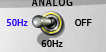
In many cases, these vintage plugins come with dedicated modeling switches, such as “Analog / Digital” toggles or frequency settings like “50Hz / 60Hz / off”.
This analog noise is continuously output. When the modeling switch is turned on, it keeps faintly sounding in the background—even on parts of the track where there is no audio clip, and even when playback in your DAW is completely stopped.
On a single track by itself, the noise is so quiet that it usually doesn’t bother you. But as you insert these plugins across multiple tracks, or follow them up with additional compressors, the noise accumulates and grows noticeably louder as your session progresses.
Simply turning the switch off or switching to digital mode eliminates the noise, but if you bought the plugin specifically for that authentic vintage hardware sound, turning off the analog modeling feature might feel counterproductive or unsatisfying. While vocals or guitars are actually playing on that track, the sound is usually fine—in fact, you might feel the analog coloration adds great flavor.
When the Accumulating Analog Noise Becomes Distracting During Silent Sections or Quiet Passages
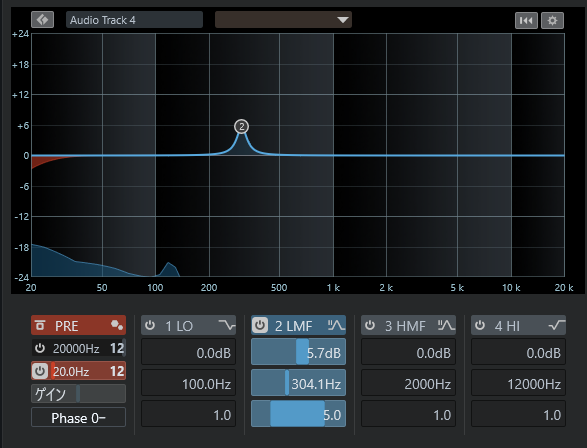
Residual analog noise spectrum (visible in the low-end rumble and 300Hz hum) lingering on an empty track.
If you’d rather not keep toggling the modeling switch on and off, there’s a simple fix: just insert a noise gate set to its minimum value right after the vintage plugin (or as the final effect on that track). This silences the analog noise during idle sections without affecting your original sound or other effects.
A standard noise gate simply mutes audio that falls below its threshold setting. When sound above the threshold plays, it passes right through without interference. That means you don’t need to tweak complex parameters—just leave everything except the threshold alone.
Setup Example (Using Cubase)
For example, if you use Cubase, you can easily load the noise gate built into the default Channel Strip on each track.
Open up this noise gate, and turn the threshold knob all the way to the left (minimum threshold, easiest for the gate to open).
With this setting, it won’t affect your original sound or other effects at all (at least within what the human ear can perceive).
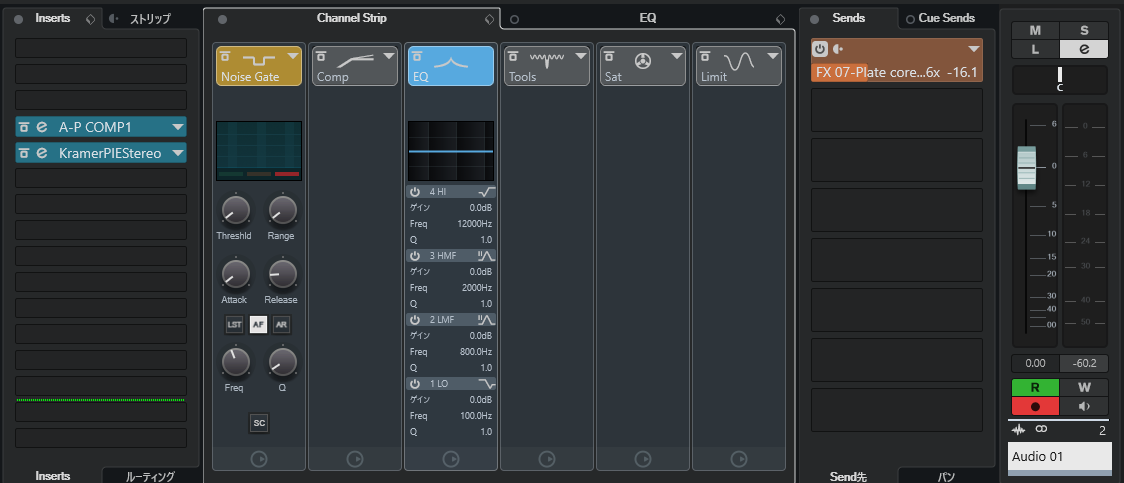
Cubase Channel Strip setup. (English reference: 「インサート」 = Inserts, 「ストリップ」 = Channel Strip, 「ゲイン」 = Gain).
If you find that your original instrument sound gets caught by the gate and cuts off unnaturally, the source audio might simply be recorded at an extremely low volume.
Also, any noise you hear while vocals or instruments are actively playing is likely unrelated to this plugin noise, so you may want to look into dedicated noise reduction software or consider re-recording.
Another option is using DAW automation to bypass the analog effect during empty sections of the track, but that requires much more effort. If you still feel hesitant about inserting a noise gate even if it doesn’t color the sound, automation remains an alternative.
If you bought a great vintage plugin, love how it sounds, but were struggling with the constant analog background noise from the hardware emulation, I hope this guide helps you out.
Discover Analog Warmth Without the Headaches
At Lo-bit record, we design high-precision DSP audio plugins combining authentic vintage character with zero unnecessary workflow friction—including our vintage optical/PWM hybrid compressor A-P COMP1 and tube plate reverb Plate core 12AU7 seen in the production setup above. Test them out right in your browser!
*Tracks created using the environments, gear, and techniques featured on this site are available for preview and free download in the Lo-bit LAB Free BGM Library. Continuously updated.*

Lin Wolinski / Lo-bit record
Musician, Recording & Mixing Engineer, Music Instructor (Guitar, Bass, DTM, Composition & Arrangement), and C++ Audio DSP Plugin Developer.
Active as Bassist, Synthesist, Backing Vocalist, and Composer/Arranger for the rock band "Once Grace Forever".
Following musical study in Australia, actively engaged in professional music production, bespoke mixing & mastering, boutique audio plugin development under "Lo-bit record", releasing royalty-free music assets, and authoring audio engineering resources.